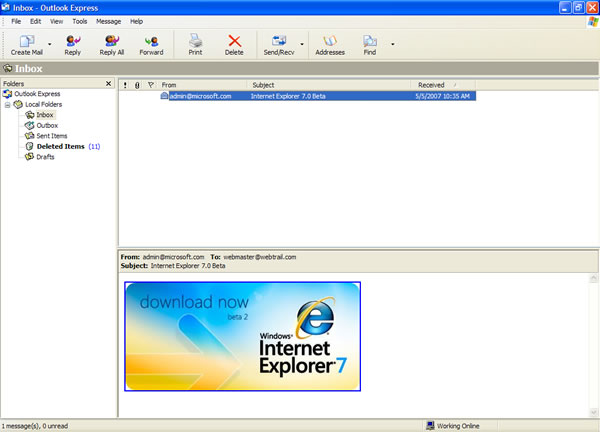
| An email disguised as a Internet Explorer
download from admin@microsoft.com contains a Trojan downloader that
infects the computer with a virus named Win32.Grum. Hijackthis shows the trojan horse adds the following information or similar lines to the Windows registry O4 - HKCU\..\Run: [Firewall auto setup] C:\DOCUME~1\User\LOCALS~1\Temp\winlogon.exe The infected file is stored in the Temp directory under Local Settings for the logged in User, and is autostarted in the following registry locations: HKEY_LOCAL_MACHINE\SOFTWARE\Microsoft\Windows\CurrentVersion\Run HKEY_CURRENT_USER\Software\Microsoft\Windows\CurrentVersion\Run |
How Can I Remove the Grum Trojan from my system?
1) Disable System Restore
2) Restart in Safe
Mode
3) Once in Safe mode, click on Start, Run
4) Type REGEDIT and press Enter
5) Navigate to the appropriate registry section by clicking on the plus signs (+) next to
- HKEY_LOCAL_MACHINE
- Software
- Microsoft
- Windows
- CurrentVersion
- Run
Firewall auto setup = %User Temp%\winlogon.exe"
%UserTemp% is the Temp folder usually in the following location
c:\Documents and Settings\{user name}\Local Settings\Temp
7) Repeat Step 5-6 above for the following location as well
HKEY_CURRENT_USER\Software\Microsoft\Windows\CurrentVersion\Run
8) Close the Registry Editor
9) Restart the computer in Normal Mode
9) Scan your computer with online virus scanner like Housecall, BitDefender, or eTrust or download and install an antivirus program and run a complete scan. A list of online scanners is below, some however will only scan but not remove issues.
10) Open My Computer, Right-click on Drive C, click on Properties, and click Disk Cleanup to delete other temp files
11) Turn System Restore Backup on
Online
Virus Checkers
Trend
Micro Housecall - will scan and remove threats
BitDefender Scan Online - will
scan and remove threats
Ewido
Online Scanner - will scan and remove threats
Kaspersky
Online Scan - will scan and remove threats
Panda Activescan - appears to only
scan for but not remove threats
McAfee FreeScan - appears to only
scan for but not remove threats
eTrust Antivirus Web Scanner -
will scan and remove threats
Symantec Security Check - will
scan and remove threats
Dr.Web Online Check
- user can upload and
test for threats on particular files

| Search PCHell.com |
|
| site search by freefind | advanced |
Tools for Removing Spyware, Adware, and Malware
PC HELL
Other Pages
Welchia (Dllhost.exe and SVCHost.exe) Worm Removal
Uninstall Antivir Instructions
How to Manually Run the Microsoft Malicious Software Removal Tool
Bloodhound.Exploit.6 Virus Removal
Backdoor SDBot.H Trojan Removal
iPadastic - News, Tutorials, Help, Tips, and Hints for the iPad
Download Hoyle Games
including Casino 3D, Card, Board, and Solitaire games.